Desktop Client: How to customize the activity box that it can be selected from the toolbar (VSM)
Customizing the shape in the library (on the Toolbox toolbar), if necessary:
-
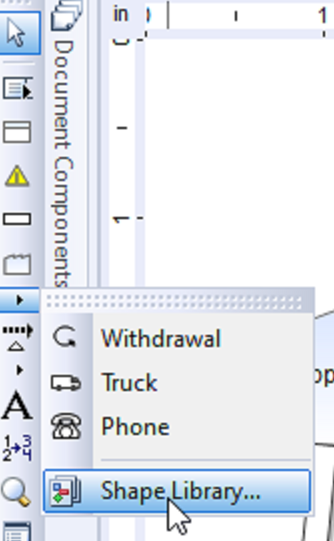
AFTER you have adjusted the data sets (etc.) that you want to have, click to open the Shape Library
-
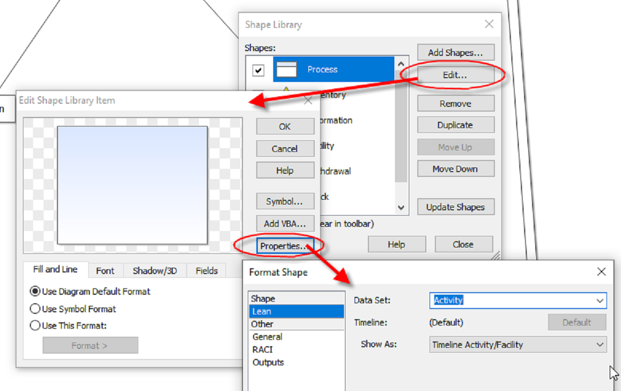
Select the shape to customize, click Edit, and edit the characteristics you want to customize, including clicking Properties if you want to set a certain "Data Set" for a Lean VSM shape:
(Creating (and disseminating) a template)
-
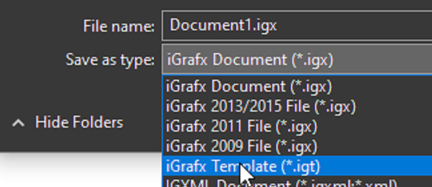
You can save as a template the file that has the settings, look-and-feel, shapes, etc. that you want. Go to the file menu, choose Save As, and choose iGrafx template format
-
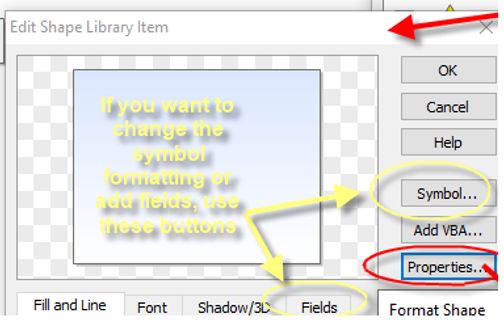
Use 'Symbol' button and the 'Fields' tab in the shape properties when editing the shape library.