Desktop Client: How to simulate seasonality of inputs into a process across the year
You can simulate seasonality by leveraging the “Timetable” generator type.
The screenshot below uses this generator type to identify that you would expect 255 transactions per hour (i.e., 6120 per day).
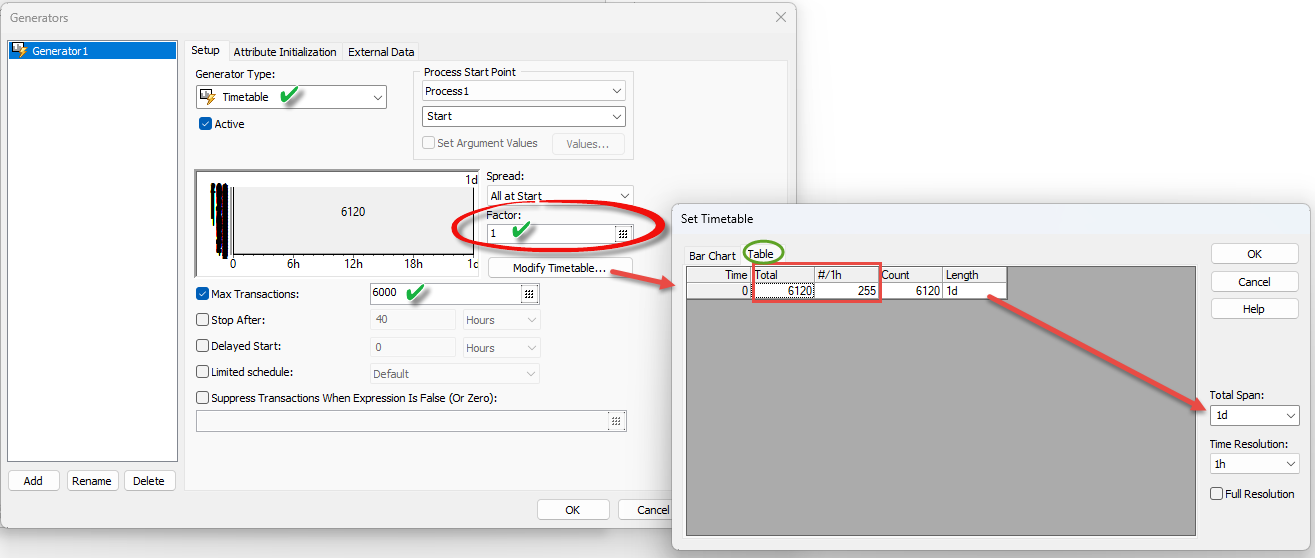
You can enter the transactions in terms of hours and it will calculate the corresponding number per day, or you can enter the transactions in terms of per day and it will calculate the number per hour. For these calculations, it will use whatever ‘span’ you’ve defined as a parameter.
The screenshot shows the we’re using a span of 1 day. Notice that there is a “Factor” parameter which defaults to 1. This means that all things being equal, it will simulate the exact numbers entered for the frequency (above).
However, let’s now assume that for the holiday season you expect to have 25% more transactions. To simulate this, you would simply change the “Factor” parameter to 1.25 …. If you expect things to slow down, let’s say by 30%, you would change the factor to .7
Notice also that you can always put a limit for the transactions. For this, you would enable the Max Transactions checkbox and enter the limit right there. The screenshot suggests a maximum of 6000 transactions per day (which is the span selected for the timetable).
Please reach out to our Professional Service Team to learn more.