Kerberos SSO stops working after updating to iGrafx Platfrom 18.x
After updating to version 18 or later, you may encounter issues with Kerberos SSO no longer working. In the igrafx_server.log file, you will see a "negotiate header was invalid" error followed by an "Encryption type RC4 with HMAC is not supported/enabled" or similar error. The reason for this is that Java has dropped support for HMAC and 3DES encryption with release 11.0.17 - to fix the problem, you will need to enable AES128/AES256 encryption for Kerberos.
Step-by-Step guide:
- Open Active Directory Users and Computers and locate the service account used for Kerberos. If you do not remember which service account was used, open your igrafx.properties file to get the SPN (in the sample screenshot below, the SPN is HTTP/yourdomain.local@YOURDOMAIN.LOCAL), then do an advanced search for "logon name starts with" and search for the SPN.

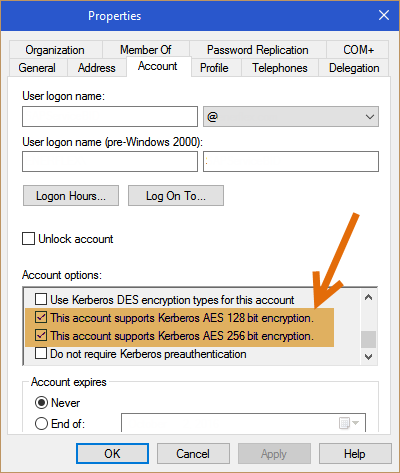
- Open the account properties, go to the "User Account" tab and check both options for "This account supports Kerberos AES128/AES256 encryption" in the account options:
- Recreate the Kerberos keytab file as described in https://doc.igrafx.com/doc/installation-guide/post-deployment-steps/configuring-authentication/kerberos-via-spnego-authentication
- Copy the newly created keytab file to your iGrafx server (file name and location are specified in the igrafx.properties file) and restart the iGrafx service.