Steps to create a support ZIP with log files for troubleshooting
Frequently, when working with our Customer Success and Support team, we will ask you for a support ZIP file. This diagnostic file contains some general information about your iGrafx Platform instance and health, as well as can be outfitted with log files to help troubleshoot and investigate the events going on in your platform. Commonly, we will ask you to attach this file to your ECHO Service Desk tickets at https://echo.igrafx.com.
Step-by-step guide
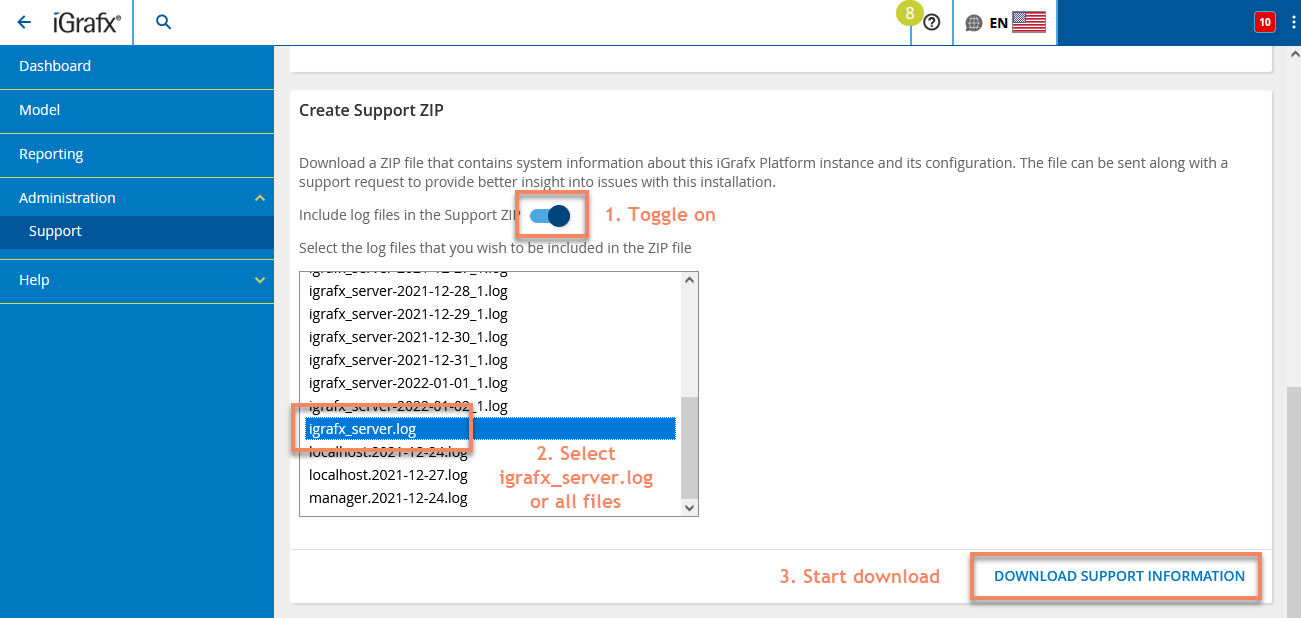
You can create a support ZIP (including relevant log files) by following these steps
- Go to
Administration → Support → System Information - Scroll down to
Create Support ZIP - Toggle
Include log files in the Support ZIPto on CTRLclick through all files in the below dropdown, or at least select theigrafx_server.logfile- Click
Download Support Informationin the bottom right - A ZIP file will download that you can attach to your ECHO ticket or email.
info
If you forget to select the right files after turning on the checkbox, no log files will be attached. Be sure to toggle Include log files in the Support ZIP and select all files in the list below.
Details
| Related issues |
|---|