18.3.7 Datacenter Release Highlights
Product Blog Updates
The Product team has a blog. Check out the blog if you want to learn more about what the Product team at iGrafx is thinking.
New blog posts since the last Release Highlights:
-
https://doc.igrafx.com/doc/2024-01-18-doc-igrafx-com-updates
-
https://doc.igrafx.com/doc/24-01-16-tree-children-with-unread-changes-orange-
Features
Diagram Defined Custom Properties released to General Access
Diagram Defined Custom Properties enables users to specify custom properties that are specific to a diagram, not shared with other diagrams.
Learn More
Diagram Defined Custom properties feature is now enabled by default.
To support customers performing change management activities, this feature may be turned off for a limited time. To do so, navigate to: Administration → Server Settings → Early Access and disable Diagram Defined Custom Properties in the List Note: Diagram Defined Custom Properties will receive a Product Integration date which will be displayed in the information icon of the Early Access page toggle. Release Highlights will also note when features receive Product Integration dates
|
Undo Check Out for Admins
When an Admin needs to Undo the Check Out for another user, Admins may now see the option located underneath “File” next to Check Out and Check In
Learn More
Undo Check Out is now displayed in the File menu for Admin. This enables an Admin to Undo Check Out diagrams other users have checked out without needing to navigate to the Details tab. Note: This does not change Undo Check Out permissions or functionality. There is no change for users using Undo Check Out for their own diagrams. Undo Check Out is still an option in the “Details” tab for Admin and non-Admin users. |
Early Access
How to enable Early Access features
How to enable Early Access features
|
New Diagram Experience
The New Diagram Experience Early Access feature continues to undergo major improvements. If you turn this feature on and have feedback on where we are headed we would like to hear from you. Please submit a ticket to the Service Desk to do so.
This feature may be turned on or off by users individually while the feature is in Early Access, separately from the Server Setting. Navigate to: Profile Picture in top right → My Profile → Early Access and toggle New Diagram Experience
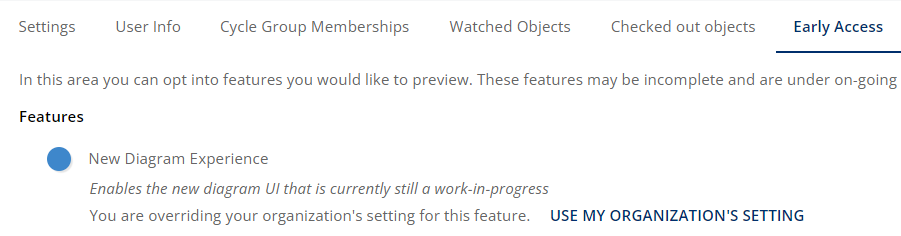
Note: This update changes left and right mouse button functions when the New Diagram Experience Early Access feature is enabled. Learn more about UI Plans in the Product Blog.
-
Left click hold mouse dragging does group/lasso selecting
-
Right click hold mouse dragging does panning
Visual Updates
List of minor visual updates made in 18.3.7
This list of visual updates is provided for customers that need specific awareness of UI updates to Process360 Live Design.
Learn More
Administrative settings for groups and risks were re-arranged at: Administration → Security Roles → Repository Roles → For each repository role type
| |
Repository Configuration, Administration, and My Profile now use the same Material UI styling as the “Model” section to improve consistency of look and feel across the product. This includes many small changes that are only likely to be noticed by those comparing to old screenshots in these areas. Content and general positioning of content remains the same. |