Chapter 2.7.1 Pia Document Ingestion
Pia+ Document Ingestion requires the corresponding platform license. Once that license is in place, the feature is available automatically whenever the Pia Diagram Creation toggle is enabled under Server Settings → AI Settings. If you do not currently have the Pia+ Document Ingestion license, please contact your account manager to learn more.
Creating a new Diagram with Pia Document Ingestion
-
In the Pia chat, click on the file selector icon.
-

A file picker dialog will appear, and you can select one or more files.
-
The files you select should be relevant to the process diagram you would like Pia to generate. Both document and image files are supported.
-
Accepted file types include: .doc, .docx, .pdf, .pptx, .md, .txt, .xls, .xlsx, .rtf, .odt, .odp, .ods, .png, .jpg, .jpeg, .gif, .webp
-
-
When you have made your selection, it will be shown above the text input in the chat.
-
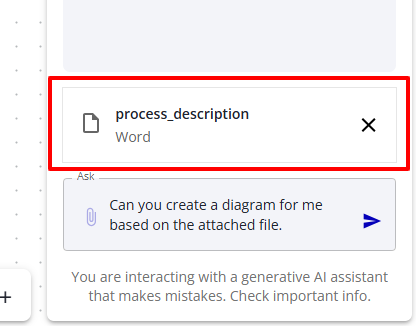
You can click on the X to remove a file selection if you change your mind, or need to select different files.
-
-
Proceed to talk to Pia as you normally would. The files will be sent to Pia for ingestion and can be referred to for the rest of this conversation session.
-
You can also attach additional files in subsequent messages within the same Pia chat conversation. All attached files remain available for Pia to reference for the rest of the session.
Uploaded files are not retained by iGrafx. They are available only within your current Pia conversation session and are discarded when the session ends.
Disclaimer
Pia is a generative AI assistant that makes mistakes.